# Tahoe 100M
#### Necessary Disclaimers and Legal
The user is responsible for reviewing and complying with the license requirements of the data referenced in this documentation.
## Citations for Tahoe 100M Dataset
The paper titled [Tahoe-100M: A Giga-Scale Single-Cell Perturbation Atlas for Context-Dependent Gene Function and Cellular Modeling](https://www.biorxiv.org/content/10.1101/2025.02.20.639398v3) describes how the Tahoe 100M dataset was curated and is currently published on BioRXiv.
Tahoe 100M is hosted as part of [Arc Institute’s Virtual Cell Atlas](https://arcinstitute.org/tools/virtualcellatlas).
The instructions for Arc Institute’s official version of the dataset is hosted on [their Github.](https://github.com/ArcInstitute/arc-virtual-cell-atlas/blob/main/tahoe-100M/README.md)
## Overview of Tahoe 100M
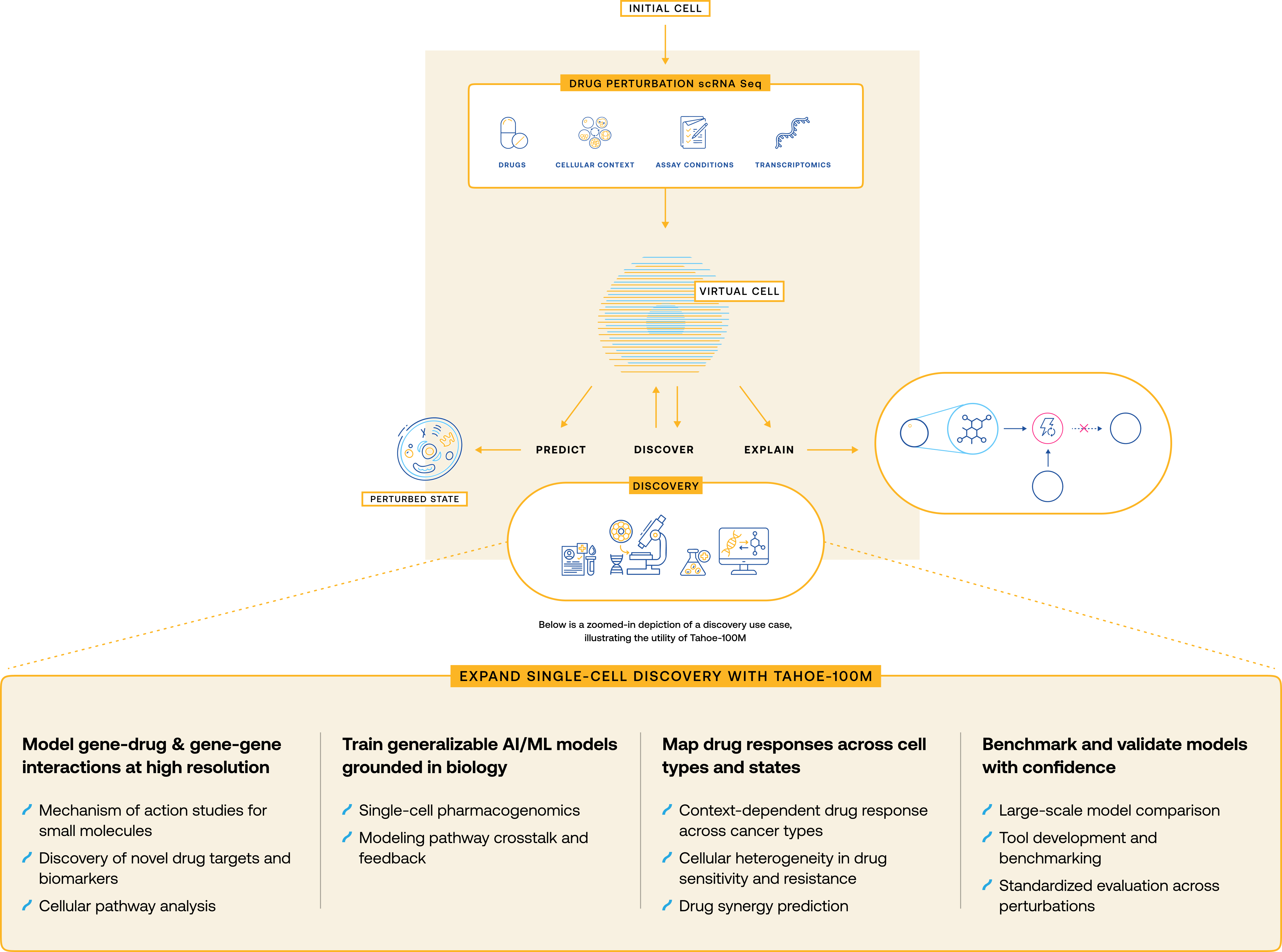
The Tahoe 100M dataset was generated using Tahoe’s Mosaic Platform in partnership with Parse Biosciences and Ultima Genomics. This 100 million single cell dataset has been curated to accelerate discovery through modeling of gene-drug and gene-gene interactions at a single cell level, training AI/ML models grounded in single cell biology, mapping drug responses across cell types and states, and benchmarking and validating modeling with confidence due to the size. These use cases are further illustrated in the figure below:
The Tahoe 100M dataset is now available as part of the Arc Institute’s Virtual Cell Atlas, which is openly accessible for scientific use. On ADAPT TAP, we have downloaded this data for your use on the platform without having to download or set it up further. See the “Where to Access Tahoe 100M” section below to start accessing the dataset.
## Where to Access Tahoe 100M
The following files are available for the Tahoe 100M dataset:
* The original set of files retrieved directly from Arc Institute’s GCP storage. The location of these files are [here on the platform](https://platform.dnanexus.com/panx/projects/J2XK7gj0xz3jkYPzPb0vp72p/data/data/anndata).
* The AnnData files are converted to Parquet files, for users who would prefer to use big data analytics tools, including Spark, to analyze the Tahoe-100M data. The location of these files are [here on the platform](https://platform.dnanexus.com/panx/projects/J2XK7gj0xz3jkYPzPb0vp72p/data/data/parquet).
To use the dataset, please copy the data into your own TAP project space. Details on how to copy the data are present under the section titled "Copying Data into a Project".
## Running Analyses on Tahoe 100M
#### Copying Data into Project
To utilize the dataset, please copy the data from this project into your own project. Here are the steps to copy the Tahoe-100M data into a TAP Project Space:
1. Create a project for your Tahoe 100M dataset, billed to your own TAP organization. Tutorials on how to set up a project can be found [on this page](https://documentation.adapt-tap.dnanexus.com/projects/overview-of-a-project).
2. Select the data in the [TAP Data: Tahoe 100M Project](https://platform.dnanexus.com/panx/projects/J2XK7gj0xz3jkYPzPb0vp72p/data/).
3. Select "Copy" on the top right menu, and select the project that you created in Step 1.
4. Then, go to the project space you created in Step 1 to start exploring the Tahoe 100M dataset and notebooks.
5. To run the JupyterLab Notebooks, please see the [JupyterLab section ](https://documentation.adapt-tap.dnanexus.com/interactive-cloud-computing/jupyterlab/introduction)or the [AI/ ML Accelerator- ML JupyterLab ](https://github.com/DNAx-corp/ARPA-H-ADAPT-Documentation/blob/main/datasets-available-to-tap-users/broken-reference/README.md)section, depending on the notebooks that you are selecting and the apps that you have access to.